
Showing posts with label cataloguing. Show all posts
Showing posts with label cataloguing. Show all posts
Technical Services Overview
This tutorial covers the basics of cataloguing, acquisitions, serials, and the tools for technical services workflows in Koha.

Attach items into a single record

Items with discrete records are not convenient for users to find through OPAC. Koha users can attach/merge items with separate Biblio into a single record. Here are the steps to attach items with discrete Biblio.
For example, bound volumes of Economic and Political Weekly catalogued as separate records with items. The search result shows many records of the journal bound volumes. If we merge all the records into one, users can find the entire journal bound volumes details by opening a single record.
For example, bound volumes of Economic and Political Weekly catalogued as separate records with items. The search result shows many records of the journal bound volumes. If we merge all the records into one, users can find the entire journal bound volumes details by opening a single record.
Cataloguing of multi volume books
Here is the method to catalogue multi volume books. Here I am trying to catalogue the book "The Complete works of Swami Vivekananda". This books has nine volumes. Enter the biblio part same like any other book.
Customise Bibliographic framework
Default cataloguing data entry sheet appears with all MARC-21 fields. This not convenient for fast cataloguing.
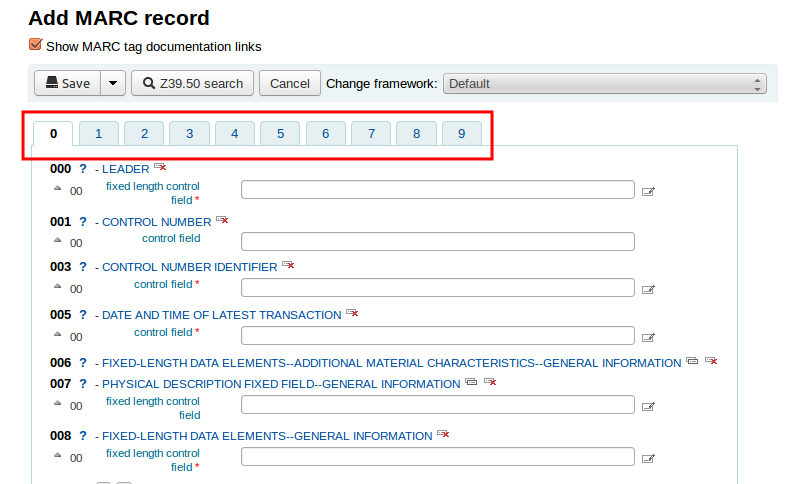
How to disable unwanted fields and retain commonly used MARC-21 fields.
Go Administration > MARC Bibliographic Framework
Click on the Import button against Books, Booklets, Workbooks

Download a model framework from here and save it in your system.
Upload the sample framework. Click on the Import button.


Selected fields have arranged in single tab. You can enable or disable more fields again by visiting
Administration > MARC Bibliographic Framework
Subscribe to:
Posts (Atom)